Smart planning includes good budgeting and forecasting practices to make sure projects and business goals can be met on time. A recent report shows that project managers use some form of budgeting or financial tool 75% of the time for their projects. For many companies, spreadsheets are the go-to tool, but the amount of manual work required can cause problems down the line. Not to mention, data on spreadsheets isn’t the easiest thing to present in a meeting. This is where business budgeting software enters the discussion.
When our clients need a FP&A solution or to improve their budgeting, we turn to Solver, whether we’re working with Microsoft Business Central, Sage Intacct or any other ERP platform. While we’ve talked about the basics of Solver before, beyond reporting, budgeting and analysis, it has a lot to add as an integrated part of your system, and we’ll get into more depth with this extended financial planning and analysis (xFP&A) solution.
How Does Solver Simplify Your Life with Data Management?
In the graphic below, across the bottom, you’ll see all your different data sources: like Microsoft Azure cloud hosting, your Microsoft Dynamics 365 Sales CRM, and maybe Sage Intacct ERP.
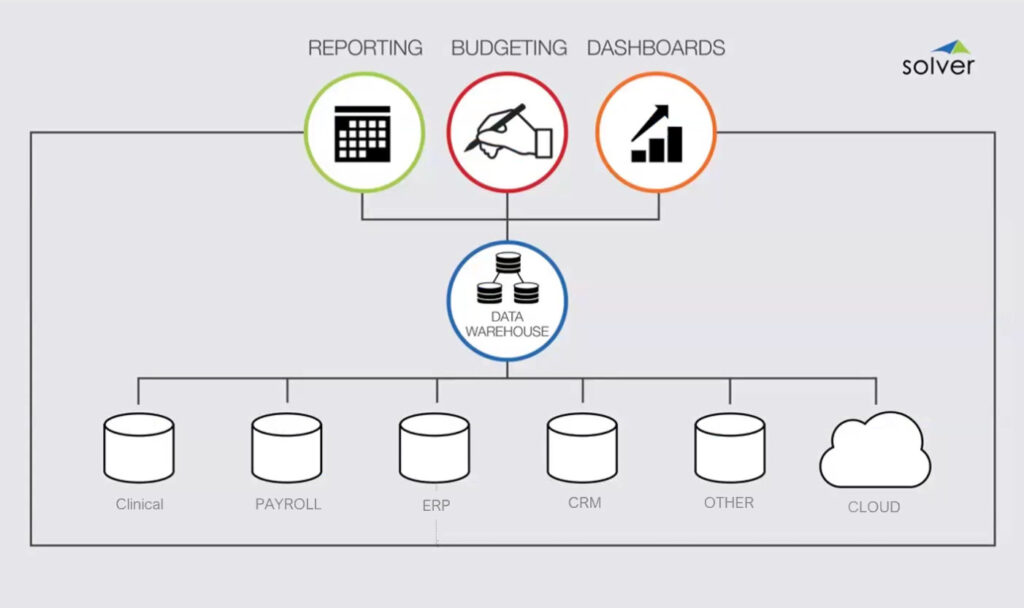
Most likely, you have a variety of systems across your different entities and locations. The beauty of Solver is that it can connect all of those systems to its one data warehouse (as seen in the center of the graphic). More than a simple business budgeting software, the warehouse allows it to handle all your reporting, budgeting, and dashboarding – saving you from needing individual solutions for each of those.
That is especially important for Business Central users, since Microsoft would have you build your data warehouse in their cloud with their tools, in a solution that doesn’t provide robust budgeting or accounting. Solver has all those tools on top of being a plug-and-play data warehouse that already has the connectors written for it. Without it, you must develop and write those connections yourself, which will cost your company more money and time.
Putting Your Financials in One Spot
Once you have your Solver data warehouse established, your company can keep track of your actuals and budgeting in a single source of truth. That lets you set up process automation for spreading your budgets or your financial forecasting, helping you make a clear business plan. What’s more, Sage Intacct users are especially appreciative of Solver’s straightforward design capabilities, with many clients switching away from Sage Intacct Planning for the easier experience.
You have tools that let you get as micro or macro with your budgets as you need, and the cloud functionality keeps everyone on the same page as your financial data is updated. Not to mention, you can set up notifications within your automations to alert the appropriate team members of relevant action items, so nothing gets missed or delayed.
Extended Capabilities for Better Insights
Access to your operational data at any time via the warehouse is already convenient, but when the extensive analytical tools within Solver get a look at that data, you’re also getting better insights faster. With its versatile dashboards pulling together all of your census, inventory, sales, purchasing, capital, quality data, and more from your ERP or other data warehouse sources, you can visualize both positive and negative trends in real-time.
These visual summaries are more inclusive for your organization, letting team members of any level of data literacy understand and put these insights into action to support your organization’s success. You don’t need extra training or IT to jump in and help generate reports. The ability to connect your execs, team, and stakeholders at the same level of understanding is built in, not to mention, it’s even easier to distil information with the addition of the Solver Copilot AI Analysis Agent.
Improving the Excel Part of the Formula
For Business Central users, the ease of adopting Solver is second nature. You’re likely already handling budgeting, modelling, and reporting in Excel – a tool that most intermediate or advanced accountants love. Solver’s interface is very familiar for Excel users, designed to be welcoming but much more flexible, allowing you to drag and drop data from different sources right into the Excel model for easy editing.
Secondly, you author all the report and budgeting models in Excel, so there’s no need to learn a whole new tool. All Solver does is take all your data sources, connects them, feeds data into Excel, and then it shares the data analysis out of your chosen business Intelligence (BI) solution, be it Solver or something like Power BI or Tableau. It’s a natural upgrade for any Excel-based workflow.
Templates and Scenarios to Tailor Your Experience
Generally, the faster you get your plan together, the faster you can start measuring results. Unlike most business budgeting software that leave you to create everything, Solver has predefined budget templates available for various industries that can cater modelling and reporting to your needs.
There’s also Solver’s Template Marketplace that lets you broaden your options with ease. Then, when you need to put things to the test, the What-if modelling and analysis offers so many scenarios you can run your operations through. That can help you create a plan of action for whatever comes your way and see how your budget can weather drastic changes.
Do You Need Solver?
There’s no one-size-fits-all reason to integrate Solver with your ERP. For example, companies that have already built their internal data warehouses have invested so much in the process that it likely wouldn’t make sense, unless everything’s in disarray or the process to update it are just to hard to manage. Similarly, large companies with complex processes often need the developer experience, and Solver is pretty light on its developer needs.
That makes it a great business budgeting software for:
- Almost any size company because of its light technical demands and speedy deployment. Whether you’re small & growing or established & multi-entity, it’s easy to set up & get rolling
- Those implementing a new ERP or are struggling to organize data because of the data warehouse’s capabilities and improved graphical reporting, analysis, and budgeting
Then there’s the Dynamics SL or GP factor. With support ending for these legacy platforms in 2028, Solver makes an attractive transitionary tool for companies intending to adopt a new ERP in the future. Working with Solver now, SL and GP users can get their current data into the warehouse. Then, when you make the move to software like Business Central or Sage Intacct, the data from that new system is simply added alongside the old data. In other words, it simplifies data conversion, future-proofing your business while simultaneously protecting your investment in Solver now, instead of looking for a solution to move data later.
The Overlooked Upside
One of the key benefits we’ve seen with our clients is that once you connect Solver to a system, it’s really easy to teach a team how to build reports and maintain them, especially if they already know Excel. A 2024 report found that many employees (78%) felt they needed more training to use the tools and software available to them, which can be a large hurdle for team adoption. Thankfully, the onboarding is very easy with Solver and not a large shift that requires much change management. The impact to training ratio is significantly better than many other xFP&A solutions.
Plus, a reminder that it’s ERP agnostic and also integrates smoothly with systems like Power BI or Tableau.
Beyond those scenarios, Solver is in a hundred different countries. It gives you access to multi-entity, multi-currency accounting and will handle complex consolidations. It improves collaboration across teams by having workflows that let different users work on the same model so they can create individual changes to their appropriate data and then the solution compiles it all for overall review.
The Bonus Round
Honestly, there’s a lot to love about how Solver handles your data. Bringing it all together in a single source of truth that is cloud-accessible improves visibility and collaboration company-wide. You can break down data siloes, bypass manual entry errors, and streamline the way you report and convey data to the decision-makers, leading to faster, more accurate insights.
If you’re just hearing about Solver for the first time or are tired of dealing with Management Reporter or FRX, you may want to reach out to our Microsoft team. We’d love to chat and assess if it’s the best fit for your business.