The most frustrating parts of technology usually aren’t the “big” processes. They’re the everyday operational tasks that eat up time. That’s why we’re happy about the latest Microsoft Dynamics 365 Business Central release (2026 Release Wave 1). It isn’t just about adding more features. Microsoft is clearly focused on making Business Central (BC) more practical, more automated, and much easier to work in day-to-day.
Here are the Business Central 2026 Release Wave 1 updates we’re most excited about:
- Quality management software finally built in
- Expense management is now native
- Self-Billing Invoices
- Drop Shipment Improvements
AI in ERP has become standard, not optional, with 85% of ERP vendors incorporating AI features. In this recent update, AI and automation are more embedded directly inside the ERP, helping teams reduce manual work without needing separate systems, disconnected spreadsheets, or endless workarounds. We found some of the biggest wins in this release are in areas where customers have been relying on third-party tools or manual processes for years.
Quality Management Software Finally Built In
For a long time, quality control has lived outside the ERP. Teams were managing inspections in spreadsheets, tracking pass/fail results manually, or relying on third-party quality management software systems that involve integrations and an additional subscription expense.
Now, BC includes a native Quality Management module designed to bring those processes directly into the system. For manufacturers, distributors, and food or regulated industries, this is a pretty big deal because for mature manufacturing operations, the cost of poor quality can account for 15% to 20% of total sales.
Quality Checks Are Automated or Manual
One of the biggest advantages with the new module is flexibility. You can configure quality inspections to happen automatically when inventory is received or trigger one-off manual inspections when needed. Businesses can enforce quality processes consistently without relying on someone remembering to update a spreadsheet or send an email. For example:
- Certain inventory items can automatically require inspection upon receipt
- Specific vendors or products can trigger mandatory quality checks
- Teams can still perform manual spot checks whenever needed
Standardized Templates
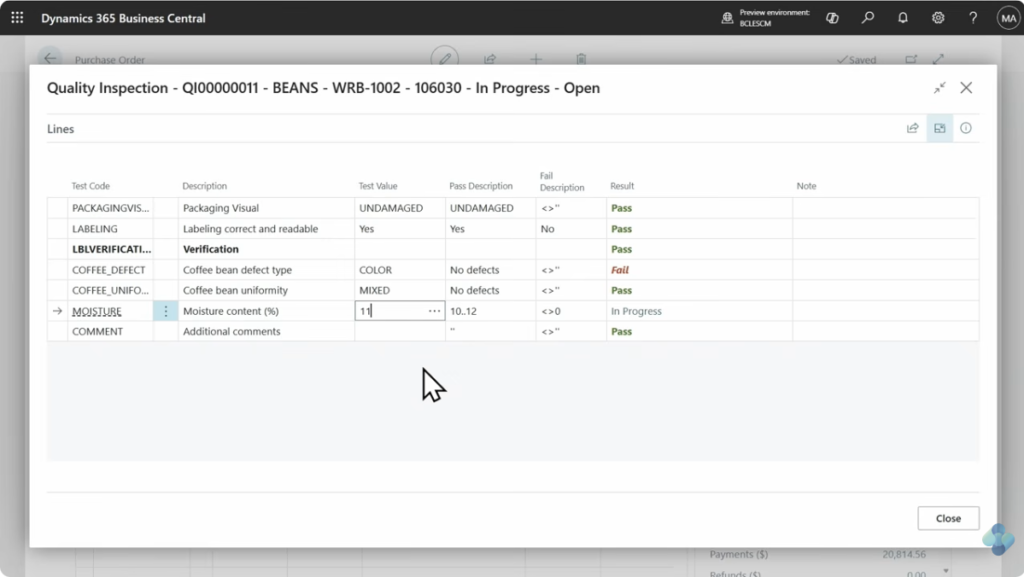
Microsoft has now given you the ability to create inspection templates. If your team checks the same measurements, conditions, or quality criteria repeatedly, you no longer need to recreate those steps every time. You can standardize inspection questions, pass/fail criteria, measurement tolerances, and testing procedures. That not only saves time, but also helps reduce inconsistencies between employees, locations, or shifts, as quality inspections and pass/fail tracking now happen directly inside BC. In fact, most businesses find standardized templates reduce task completion time by 30% to 50%, so this is a major win for many of our clients looking to have more control over their quality workflows.
Better Support for Compliance and ISO Processes
The quality management software will also appeal to organizations working toward ISO certification or stricter compliance standards. With inspections, results, and quality records now living inside BC, businesses gain better traceability, easier audit prep, more consistent documentation, and stronger process control. Instead of quality data living in someone’s desktop spreadsheet, it becomes part of the ERP process itself.
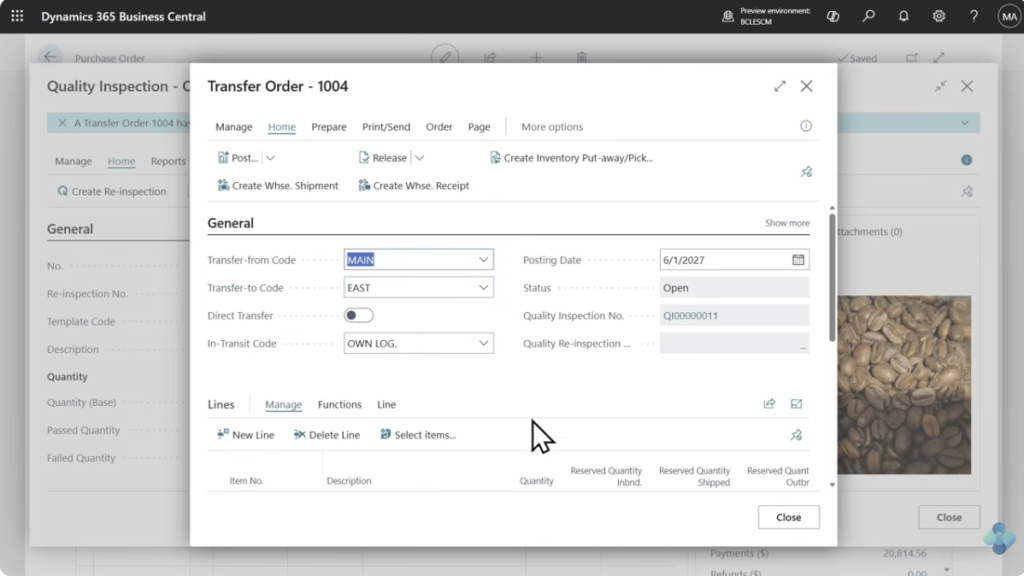
One important thing to know: the Quality Management module is not automatically enabled in BC environments. It does need to be manually added, but the setup process is quick and straightforward, and our team can help with that if you need it.
Expense Management is Now Native
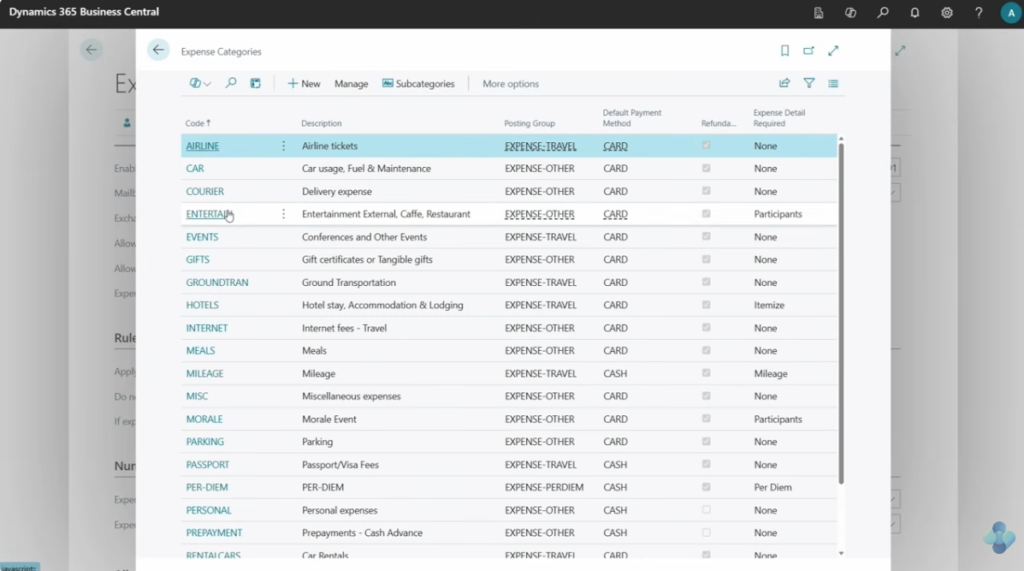
This is probably the update that will get the most attention. Historically, expense management has been one of the biggest gaps in BC. Like with quality management software, most organizations ended up purchasing third-party expense tools because there simply wasn’t a strong out-of-the-box option available. Now there is. Microsoft has introduced a fully native Expense Management module directly inside BC, and for many small to mid-sized organizations, this could eliminate the need for a separate expense platform entirely.
More Options for Submitting Expenses
One of the smartest parts of this release is the flexibility around how users submit expenses. Employees can enter expenses directly in BC (with a BC license) or use the new Expense Agent web app to upload receipts and submit expenses without needing a full BC license. That second option is important. For many businesses, buying BC licenses for every employee just to handle expense submissions doesn’t make financial sense. The web app gives organizations another path.
AI-Powered Receipt Processing & Approvals
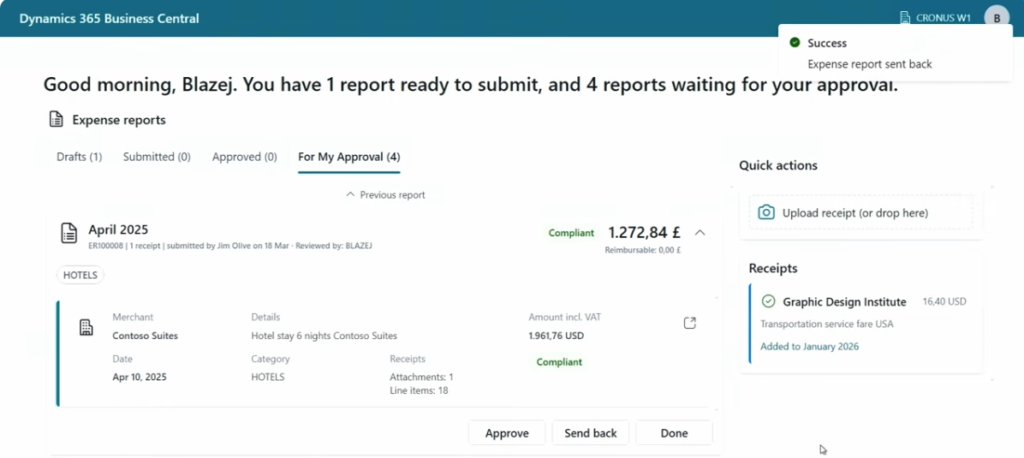
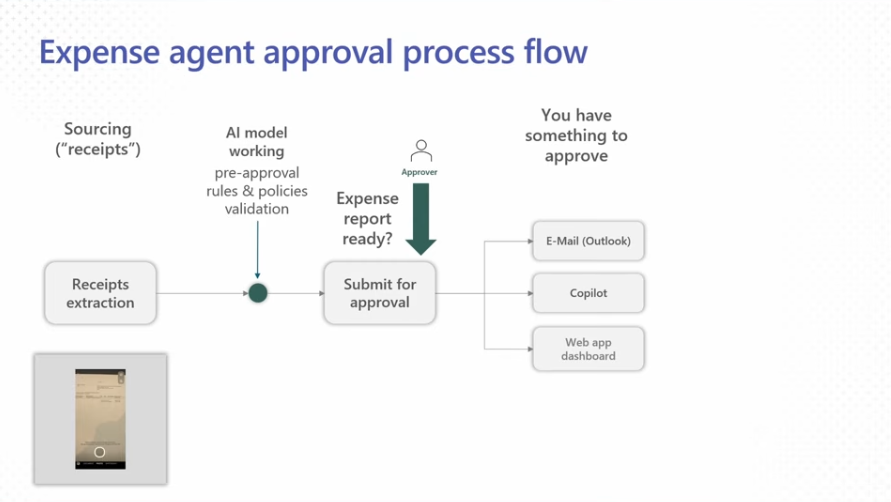
Microsoft is leaning heavily into AI-driven ERP functionality in this release, and expense management is one of the clearest examples. The Expense Agent uses AI and Copilot capabilities to:
- Extract receipt information
- Categorize expenses
- Route approvals automatically
- Reduce manual data entry
Employees can simply scan receipts and submit them through the app, while approvers can review and approve directly from Outlook, Copilot, or web dashboards. The result is a much faster approval process with way less administrative overhead.
The Expense Agent functionality uses Copilot credits/tokens for receipt processing. You can purchase credits beforehand, which helps reduce processing costs depending on how much you use. We recommend evaluating expected transaction volume before deciding what to do.
Does This Replace Third-Party Expense Platforms?
For some companies: absolutely. For others: maybe not. Large enterprises with complex approval structures, heavy travel policies, or very high user counts may still find specialized ISV expense platforms more robust, but for many small and mid-sized businesses, this new functionality could be more than enough, especially if paired with Microsoft Forms, Power Apps, or Employee Portals. In fact, for companies trying to reduce software sprawl and simplify their tech stack, this release creates some very attractive options.
Smaller Updates That Still Save Time
Some of the most appreciated updates in BC are often the “little” ones. The changes that remove daily frustrations users have just learned to live with. This release includes several of those.
Self-Billing Invoices
BC now supports easier creation of self-billed invoices for situations where an invoice may not yet exist. If you manage vendor reimbursements, contractor scenarios, or specialized purchasing workflows, this helps streamline financial processing without waiting on other documents.
Drop Shipment Improvements
Anyone who has worked with drop shipments in BC knows how painful edits could be. Previously, if changes needed to happen after the PO was created, users had to delete the purchase order, modify the sales order, then recreate the purchase order. It was clunky, time-consuming, and mistake-prone. Now, Microsoft has significantly improved this workflow, and users can start directly from the purchase order and make changes without completely rebuilding the transaction flow. That’s the kind of operational improvement users notice immediately and will be happy about!
Microsoft’s Bigger Vision: AI-Driven ERP
The broader theme across this release is clear: Microsoft is moving Business Central toward a more intelligent, AI-assisted ERP experience, and importantly, they’re doing it inside the workflows users already use. This 2026 Release Wave 1 feels especially valuable because they target the real operational pain points. Not just flashy demos or theoretical AI use cases.
If you need help figuring out what new capabilities make sense for your organization, our team is happy to walk through the options with you. Just reach out today to get started!